Eliminate No-Shows Dynamically with Automated Email Reminders
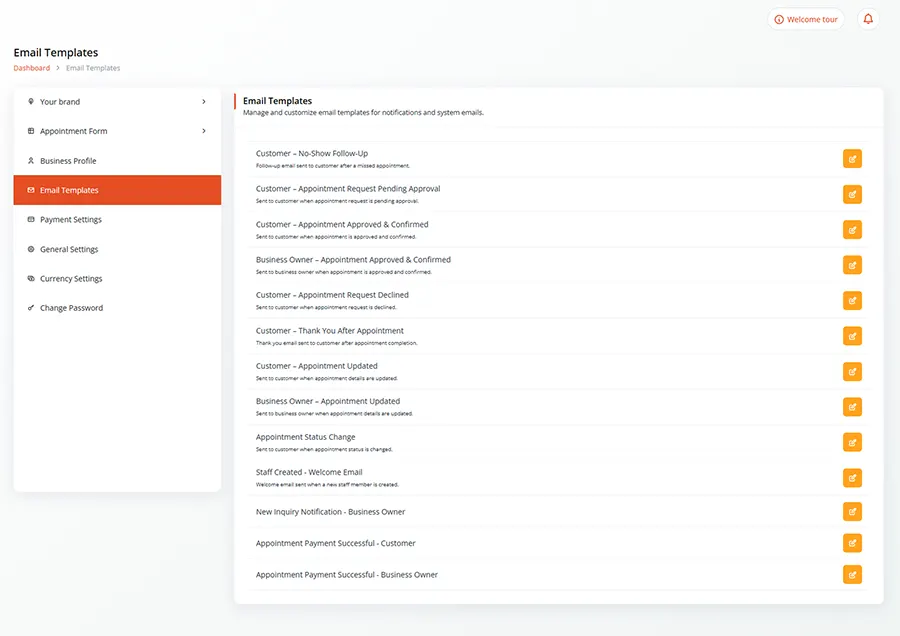
Reduce missed appointments by up to 85%. CalendarLite automatically triggers fully personalized confirmation sequences, custom event reminders, and follow-up emails tailored perfectly to your client’s time zone.
Gain complete control over your customer touchpoints. CalendarLite works in the background to ensure every attendee turns up prepared, informed, and precisely on time. Whether you are managing complex team rosters or high-volume client consultations, our intelligent automation keeps your calendar running seamlessly.
DYNAMIC CUSTOMIZATION
Build Custom Sequences for Every Event Type
Create hyper-targeted communication timelines that align with specific booking types.
Whether it is a quick 15-minute discovery call or a multi-day workshop, configure tailored intervals—such as instant confirmations, 24-hour horizon warnings, or 15-minute final alerts—to fit the exact rhythm of your business operations.
DATA-DRIVEN PERSONALIZATION
Inject Smart Placeholders for High-Touch Personalization
Make automated emails feel bespoke, intimate, and highly professional.
Our advanced dynamic field syntax pulls real-time calendar and form data seamlessly. Automatically populate recipient names, dynamic location metrics, video room links, host profiles, and custom intake form answers directly into the email body without lifting a finger.
HYBRID OFFICE SYNC
Intelligent Time-Zone and Location Mapping
Ensure your reminders hit the inbox at contextually perfect moments.
If you book a meeting in New York with a client based in London, CalendarLite automatically translates dates, times, and delivery schedules to matching local intervals. Zero confusion, zero midnight pings, and absolute clarity on the calendar invite.
OMNICHANNEL RECOVERY
One-Click Rescheduling & Cancellation Loops
Give your clients a smooth way out before they leave an empty seat.
Every automated email embeds smart, secure action buttons. If a client’s schedule shifts unexpectedly, they can effortlessly reschedule or cancel the engagement directly from their inbox, instantly updating your calendar availability for other prospects.
DELIVERY CERTIFICATION
Complete Brand Ownership & Custom Domains
Keep your brand front and center throughout the user journey.
Eliminate third-party watermarks. Premium tiers allow you to authenticate your own corporate email domain via DKIM/SPF protocols. Send all transactional reminder sequences directly from your personal or company handle (e.g., hello@calendarlite.com) to maximize deliverability and trust.
How many email reminders can I send per appointment?
You can create unlimited reminder rules for each event type. Most high-conversion workflows utilize a three-step sequence: an instant confirmation on booking, an informative prep email 24 hours prior, and a high-visibility link alert 1 hour before the start time.
What happens to the reminder schedule if an appointment is rescheduled?
The platform manages data states in real time. The moment an appointment is moved or updated, the system instantly purges the old notification queue and spins up a brand-new delivery timeline mapped to the fresh meeting slot.
Can I include custom video conferencing links inside the reminders?
Absolutely. CalendarLite integrates natively with Google Meet, Zoom, Microsoft Teams, and Webex. The specific, unique meeting link generated during the initial booking is securely held and populated into every reminder email automatically.
Do you support SMS notifications alongside email reminders?
Yes! While email handles comprehensive agendas and calendar invites beautifully, you can easily connect and layer instant SMS text alerts for time-sensitive, final-hour notifications via our integration dashboard.
Ready to Secure a 100% Filled Schedule?
Join thousands of modern businesses relying on CalendarLite to save administrative hours and maximize meeting attendance.